
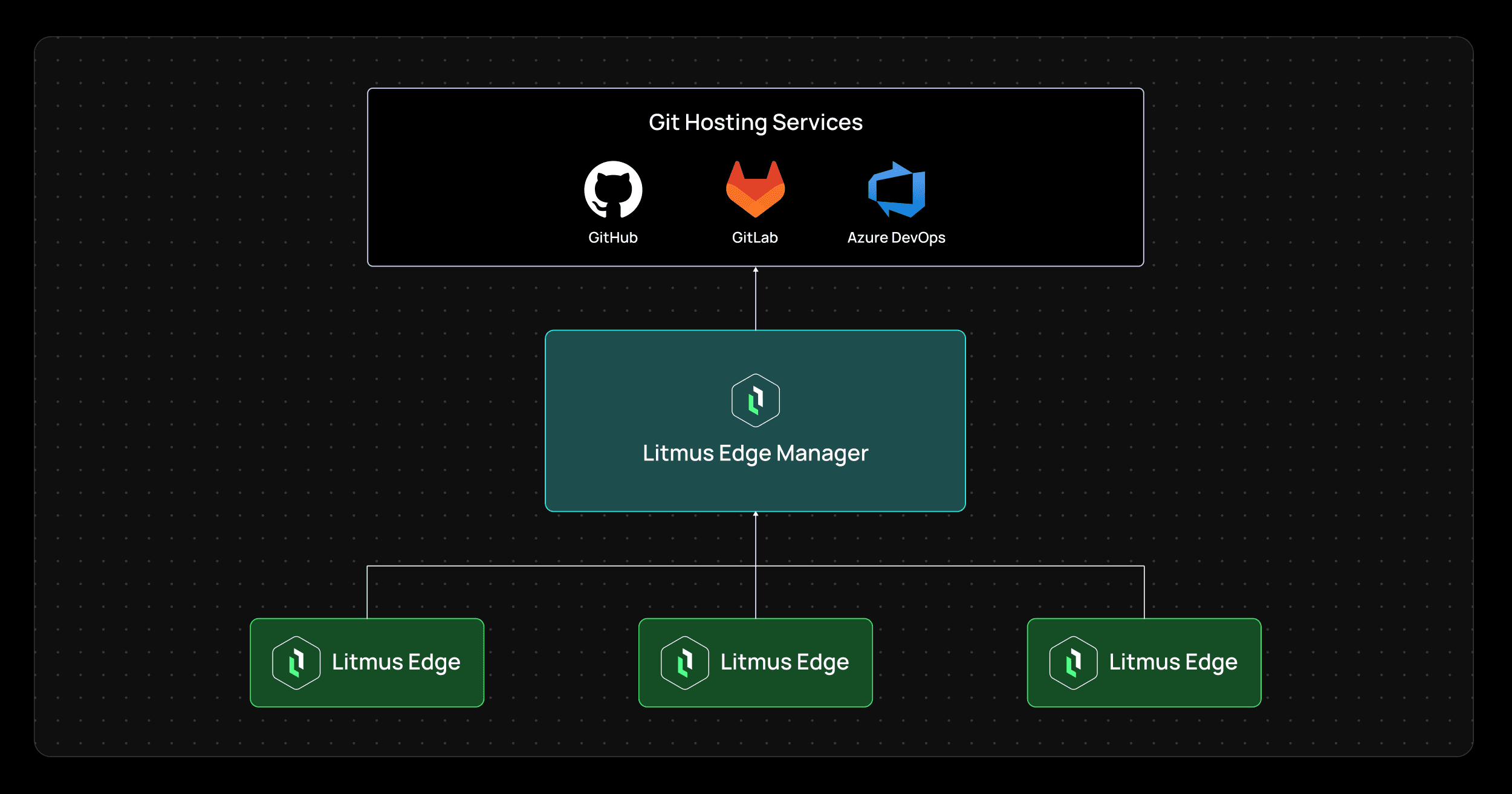


As industrial edge deployments grow across plants, lines, and facilities, configuration control becomes harder to maintain. Templates evolve, deployments drift, and teams often lack a clear record of what changed, when it changed, and which edge environments were affected.
Litmus Edge Manager Git Integration solves that problem by connecting Litmus Edge Manager to GitHub, GitLab, or Azure DevOps so Litmus Edge template files can be synchronized into a Git repository using standard Git workflows. The integration is designed to improve version control, auditability, and centralized governance for distributed edge deployments. Rather than treating template management as a manual admin task, Litmus Edge Manager makes Git part of enterprise change control for edge operations. That gives industrial teams a more structured way to track configuration changes, maintain consistent baselines, and align edge deployment practices with broader IT and engineering governance.
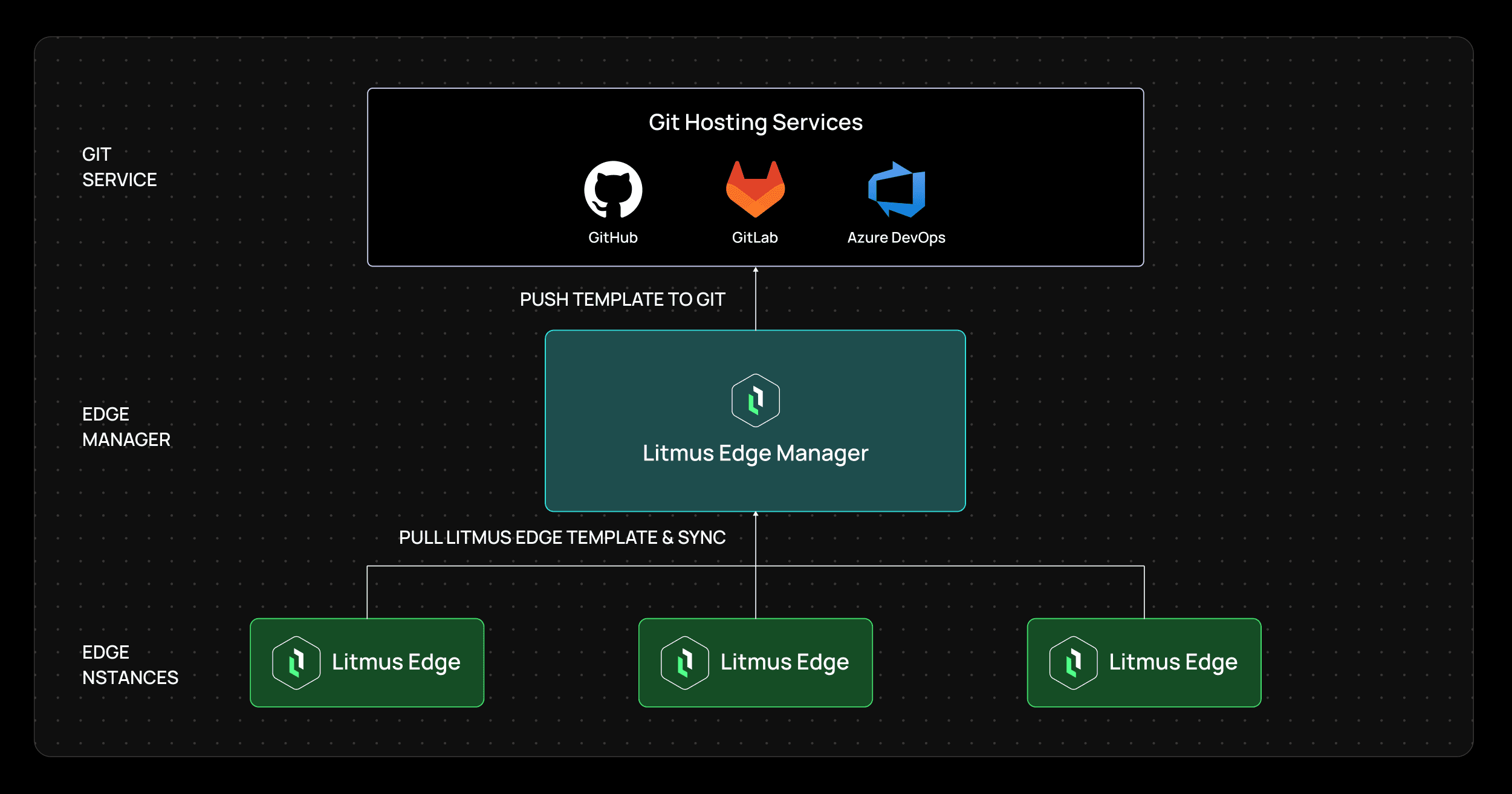
Litmus Edge Manager Git Integration is a one-directional synchronization capability that pushes Litmus Edge template files from managed edge environments into an external Git repository. It supports GitHub, GitLab, and Azure DevOps, and is configured through the Litmus Edge Manager Admin Console.
This matters because template files are often the foundation of repeatable deployment. They define how edge environments are configured, and they influence how consistently applications, data pipelines, and operational models are rolled out across sites. With Git integration, organizations can:
version Litmus Edge template files in a standard source-control system
track configuration changes across companies and projects
synchronize template updates automatically or manually
improve auditability for distributed edge deployments
maintain more consistent configuration baselines at scale
In short, Litmus Edge Manager turns Git into a governance layer for template-driven edge operations.
Distributed edge programs slow down when every site is managed differently. Even when teams have a centralized control plane, they still need a reliable way to version template files, review changes, and maintain consistency across many deployments. Litmus Edge Manager already has capabilities like centralized control, governance, and repeatable rollout as core to scaling edge programs across facilities. Without Git-backed change control, teams often run into problems such as:
configuration drift between plants or projects
poor visibility into template changes over time
inconsistent rollout practices across teams
difficulty proving compliance or change history
manual backup and export habits that do not scale
Git integration addresses these issues by extending Litmus Edge Manager’s centralized operating model with repository-based synchronization and change tracking.
At a high level, the integration connects Litmus Edge Manager to a Git repository over SSH and synchronizes Litmus Edge template files into that repository. The workflow is straightforward:
create a repository in GitHub, GitLab, or Azure DevOps
configure the provider in Admin Console > Integration > Git Provider
use the SSH URL for the repository
copy the public key generated by Litmus Edge Manager
add that key to the repository as a deploy key with write access
validate repository access
save the integration
configure project-level synchronization in Edge Devices > Edge Git Integration
One of the stronger parts of the design is that synchronization is configured at the company and project level. In the Project Tracking view, teams can see the operational state of Git synchronization across their environment. This view includes fields such as company, project, whether tracking is enabled, whether sync-on-backup is enabled, device counts, synced device counts, last sync time, last commit, and integration status. That means teams can manage Git integration as an operational control, not just as a one-time setup.
From the Project Tracking view, organizations can:
enable scheduled tracking for a project
enable sync on device backup
run manual sync for validation or urgent updates
monitor commit history linkage through the last commit field
confirm success or investigate errors through status reporting
This is important because large industrial teams need both central setup and project-level control. A single Git connection alone is not enough if teams cannot see which projects are being tracked and whether synchronization is actually working.
Git integration is valuable because it makes template governance more operational, more auditable, and more scalable.
The most obvious benefit is version control. Instead of keeping edge templates only inside a platform workflow, organizations can store and track them in a Git repository using familiar software-development and infrastructure-management practices. That gives teams a clearer historical record of how template files have evolved over time.
Git integration improves auditability and support compliance across distributed edge deployments. By synchronizing templates into Git, organizations gain a structured record of configuration changes that is easier to inspect, review, and govern. For regulated or highly controlled industrial environments, this is a major operational advantage.
A distributed edge program only scales when plants do not drift into isolated one-off configurations. Litmus Edge Manager’s broader capabilities include standardization, reusable templates, and controlled propagation of approved changes across sites. Git integration strengthens that model by giving organizations an external source of truth for template history and baseline comparison.
Git is already central to how multiple IT, platform, and DevOps teams manage change. Litmus Edge Manager’s Git integration helps industrial teams align edge template management with those same enterprise practices instead of operating in a separate, less-governed workflow.
Not every deployment needs the same sync strategy. Some teams want predictable scheduled synchronization, others want sync tied to backup events, and others need manual control for testing and validation. Litmus Edge Manager supports all three, which makes the feature practical across different governance models.
Git provider integration is SSH-based workflow using ED25519 or RSA-SHA2-512 keys. The generated public key is added to the target repository as a deploy key with write access, and Litmus notes that no credentials beyond the SSH keypair are stored. From a practical standpoint, this is important for industrial teams because it supports a more controlled integration model:
repository access is validated before configuration is saved
deploy keys are scoped to a single repository
teams can keep template history in a private repository
branch protection can be applied in production environments
validation checks help catch access or schema issues before sync problems spread
This makes Git integration more than a convenience feature. It becomes part of a governed operational architecture.
Litmus Edge Manager Git Integration supports several real-world scenarios for industrial organizations managing many edge environments.
A central team can track template updates across multiple companies and projects without relying on manual exports or informal documentation. This makes it easier to keep plants aligned to approved deployment patterns.
Teams can maintain a clearer historical record of template changes for internal review, regulated operations, or customer-facing governance needs.
Organizations that already depend on backup workflows can use sync on backup to ensure template changes are pushed into Git as part of operational continuity practices.
Manual synchronization provides a practical way to test connectivity, repository permissions, and template output before enabling a recurring schedule.
Git integration gives OT, platform, and central engineering teams a shared control mechanism for template versioning, helping reduce friction between operational deployment practices and enterprise IT governance.
Industrial edge programs do not scale on device management alone. They scale when rollout, configuration, and change control become repeatable across sites.
Litmus Edge Manager Git Integration gives manufacturers a practical way to bring Git-based version control into edge template management. By synchronizing Litmus Edge templates to GitHub, GitLab, or Azure DevOps, it helps organizations track changes, improve auditability, maintain consistent baselines, and align distributed edge operations with enterprise change-management practices.
It is a one-directional integration that synchronizes Litmus Edge template files from edge deployments into a Git repository such as GitHub, GitLab, or Azure DevOps.
Litmus Edge Manager supports GitHub, GitLab, and Azure DevOps for Git provider integration.
No. The current implementation is one-directional and is primarily intended for audit and tracking purposes.
Teams can synchronize on a schedule, during edge-device backup, or manually from the actions menu in Edge Git Integration.
In project tracking, teams can view device counts, synced device counts, last sync time, last commit ID, and integration status.
It improves version control, auditability, compliance support, and configuration consistency across distributed edge deployments.