The Litmus MCP Server has already changed how teams talk to their edge, turning "which devices are offline?" and "what's the current value on this tag?" into plain-language questions instead of dashboard hunts and one-off scripts. Now that same power installs into Claude with a single click, and you set it up through a guided form right inside the Claude. Litmus MCP is live in the Claude Directory as a connector.
It's a small step to install and a big one for how industrial teams work: the data that runs your operations is now one click away from the AI assistant your teams already use.
The Story So Far
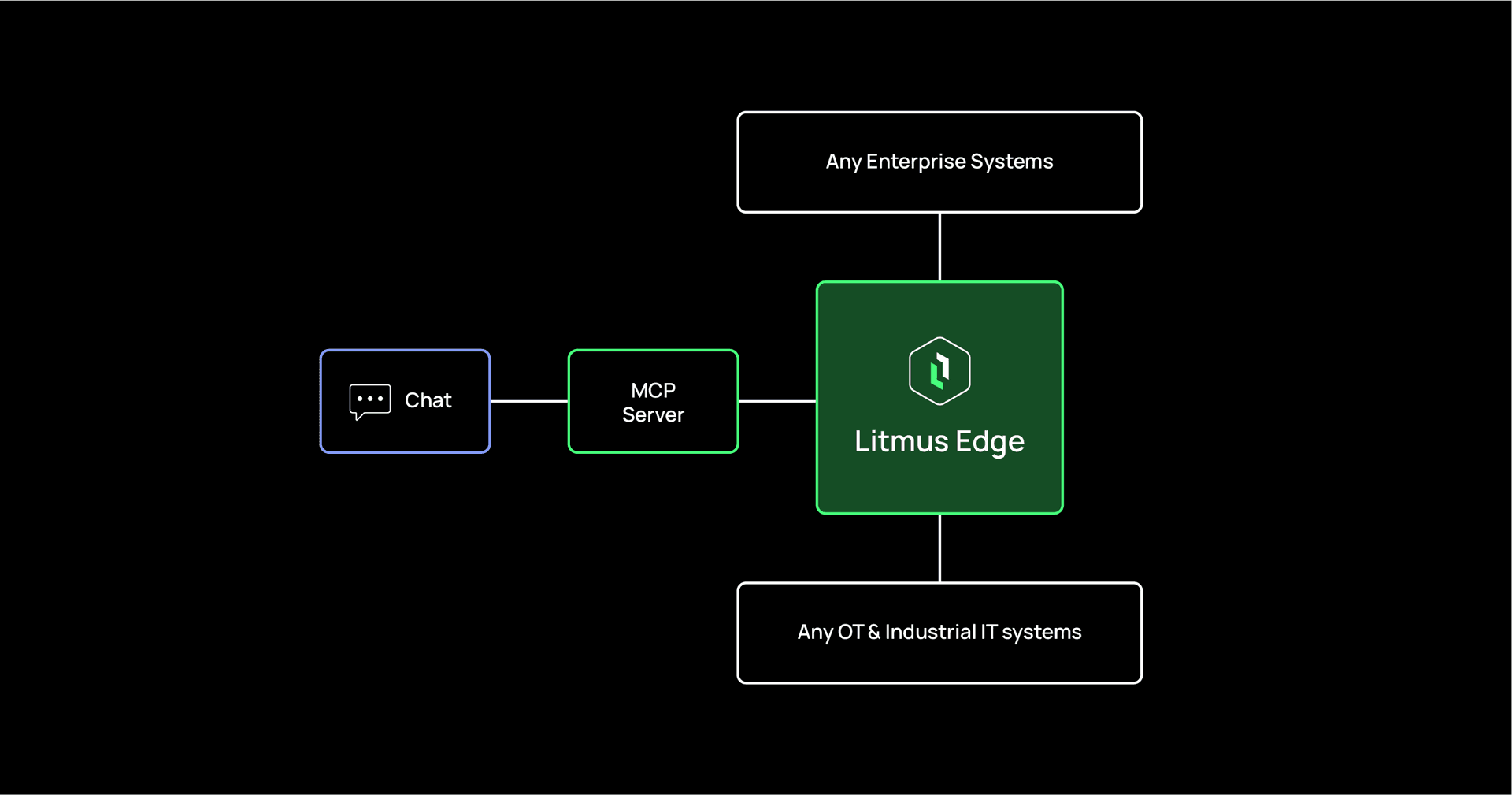
Litmus MCP Server has been available for a while. It bridges Litmus Edge (devices, tags, telemetry, history, containers, and Digital Twins) to AI assistants, IDE tools, and agent workflows through the open Model Context Protocol. Teams have used it to move from manual edge operations to AI-assisted ones, whether through the built-in chat Web UI or connected to their tool of choice.
This connector is the next step in that story. It doesn't replace anything you already run. It brings Litmus MCP to one of the most widely used AI assistants, and moves setup out of hand-edited files into a simple form inside Claude.
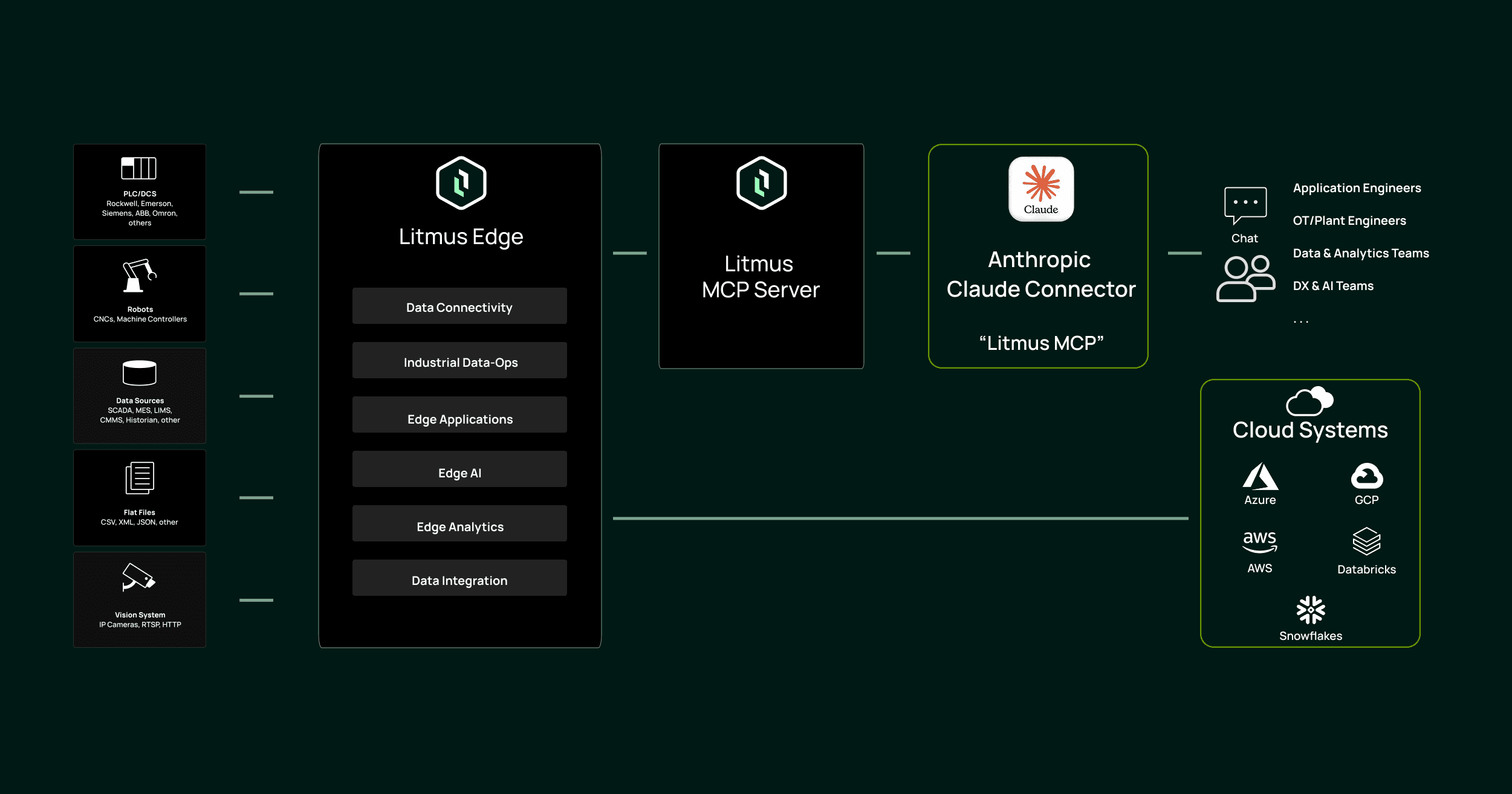 Litmus MCP in Claude Architecture
Available in Claude, Built on the Open MCP Standard
This isn't a link you paste in and hope for the best. Litmus MCP is available in the Claude Directory, the catalog of connectors built for Claude, and it runs on the Model Context Protocol, the open standard Anthropic created and released for connecting AI assistants to real systems.
For industrial teams, that matters. You are connecting an AI assistant to live operational systems, and trust is not optional. Finding Litmus MCP in the Claude Directory means it installs through the same trusted flow as any other connector, on a recognized standard, not a hobby project bolted on from a random repository. Credentials are handled securely by the client, and the connector talks only to the server you designate.
What's New: One Click to Install, a Guided Form to Configure
Connecting an MCP server to an AI client used to mean editing configuration files. The Claude Directory changes that. Litmus MCP now shows up as a browsable, installable connector inside Claude. Find it, click Install, and Claude walks you through configuration with a guided form.
Enabling Litmus MCP in Claude
You still point the connector at your environment, and that part is expected. You'll enter your Litmus MCP Server URL and your Litmus Edge details (URL and OAuth2 credentials), plus optional settings for real-time and historical data tools if you want them. The difference is where that happens: in a labeled, in-app form instead of a JSON file you edit and reload. Credentials are handled securely by the client rather than living in a text file, and the whole thing takes minutes.
Why It Matters
Faster time-to-value. No config files to hand-edit and no client-side wiring. Install, fill in a guided form, and you're connected in minutes.
AI that reasons on real data. Answers come through the Litmus data foundation, normalized and contextualized, so Claude works from trusted operational data instead of raw noise.
A familiar home for AI-assisted operations. Engineers already living in Claude can now reach real Litmus Edge operations without leaving the conversation.
Plain language in, real actions out. Ask about connected devices, live tag values, recent trends, or running edge apps, then act on the answers.
A shared layer across roles. OT, IT, data, and reliability teams can converge on one conversational way to understand and operate the edge.
Your data foundation stays yours. Litmus edge runs on your infrastructure, on-premises and at the edge, so your operational data lives where you control it. You decide how Claude connector reaches it using connector configurations within Claude.
Changing the Industrial AI Game
Most of industry is still asking whether AI belongs on the plant floor. Litmus is already shipping the plumbing that makes it work. Being one of the first industrial platforms to land a robust connector inside a major AI assistant isn't a one-off launch. It's part of a pattern:
Vetted, not improvised. Litmus MCP went through Anthropic's evaluation process to earn its place in the Claude Directory, and it's built on Anthropic's open MCP standard, so it clears a real bar as an integration built to a recognized standard and reviewed before release.
Unifying industrial data at the edge, across hundreds of protocols, vendors, and systems that were never meant to talk to each other.
Bringing DataOps to operations, turning that fragmented mess into clean, contextual, AI-ready information.
Making that data conversational, through the AI tools teams already use.
AI assistants are only as good as the data they run on, and industrial data is the hardest data there is. Litmus has spent years solving exactly that problem, and this connector is what happens when that foundation meets a modern AI assistant: forefront technology, delivered with the reliability and security the plant floor demands.
We started with Claude for a reason: it's one of the most capable and widely used AI assistants available. But Litmus MCP is open and standards-based, so this is a starting point, not a finish line:
You pick the AI. Litmus supplies the data.
Choose the assistant that fits your team; Litmus makes sure it's working with the best industrial data.
A foundation that outlasts any single tool.
As industrial AI matures, the teams that pull ahead will be the ones with that kind of foundation under everything they adopt.
That is exactly the position Litmus is built to hold: the default data layer for industrial AI.
Available Now
Litmus MCP is available today as a connector in the Claude Directory. The underlying Litmus MCP Server remains free and open-source and works across other MCP-compatible tools as well.
Want to see what conversational, AI-assisted operations can do for your plant? Book a demo and we'll walk you through it.
Frequently Asked Questions
What is Litmus MCP in Claude? It's the Litmus MCP Server, available as a one-click connector in the Claude Directory. After a short setup, you can operate Litmus Edge (devices, tags, telemetry, history, containers, and Digital Twins) through natural language in Claude.
Is this a new product? No. It's the same Litmus MCP Server teams have been using, now packaged as a connector so it installs into Claude and configures through a guided in-app form instead of hand-edited files.
Do I need to configure anything after enabling? Yes. Once enabled, you configure the connector inside Claude. Your Litmus MCP Server URL and Litmus Edge details (URL and OAuth2 credentials) are required, with optional fields for real-time and historical data tools. It's a labeled form, not a config file.
Does Litmus MCP only work with Claude? No. Litmus MCP Server is open and works with a range of MCP-compatible AI tools. We started with Claude, and support for more providers will follow. Your data foundation stays the same regardless of which assistant you connect.
Do I still need the Litmus MCP Server? Yes. The connector links Claude to a Litmus MCP Server connected to your Litmus Edge environment. The connector makes connecting and configuring it far simpler than the old manual path.
Ready to Make the Move?
Industrial teams don't need another dashboard. They need faster answers and safer actions, from AI they can trust with their operations. Installing Litmus MCP in Claude is the shortest path yet to conversational edge operations, and it's just the beginning. Get started with a demo and see it running against your own environment.