


Litmus Edge has always talked to IT systems. Its connectors send machine data to clouds, historians, databases, and message brokers around the clock, and that is how many plants feed their dashboards and data platforms today. What those connections couldn't do was hold a conversation. When a pump starts to shake, the edge knows right away. But checking whether a work order is already open, creating one if it isn't, and putting the order number next to the alert still meant someone switching screens, or a custom integration built off to the side.
IT Hub processor changes that. It's a processor in Litmus Edge Analytics that lets your edge logic ask an IT system a question, get the answer back, and act on it, all inside the same flow.
IT Hub is a processor in Litmus Edge Analytics that sends a command to an IT or business system through an Integration connector and returns the system's response to the same flow. The command can be a SQL query against a database or a request to a REST API. The answer lands on the edge message bus, where the next processor, a dashboard, or an application can use it right away.
Because it lives in Analytics, IT Hub behaves like any other processor on the canvas. You drop it into a flow, connect it to the logic that decides when it should run, and wire its output to whatever should happen next. There's no separate service to deploy and no new integration layer to learn.
Short answer: integrations move data, and IT Hub lets your logic work with the systems on the other end.
The Integration module has long been how Litmus Edge reaches IT. You configure a connector for a cloud service, database, or broker, map topics to it, and data travels that route for as long as the connector runs. It's dependable plumbing, and it treats every message the same way.
IT Hub uses those same connectors, but from inside an Analytics flow and on the flow's terms. The flow decides when to call, what to ask, and what to do with the answer. A reading can trigger a lookup, the lookup can decide whether a record gets created, and the new record's ID can travel with the next reading. A fixed data route was never built for that kind of back and forth.
| Integration connectors on their own | IT Hub processor in Litmus Edge Analytics |
Where it lives | The Integration module | A processor inside an Analytics flow |
What it does | Moves topic data to and from a destination | Sends a specific command and returns the answer |
When it runs | Continuously, for every message on the route | When the flow calls it: on a timer, on an event, or by hand |
What the flow gets back | No reply to a specific request | The system's full response, including status and errors |
Typical job | Feed a cloud, historian, database, or broker | Look up, create, or update business records in real time |
Nothing about your current integrations changes. Streaming connectors keep feeding your data platforms, and IT Hub adds a way to work with the same systems one request at a time.
Every IT Hub run is one round trip. Something triggers the processor, it sends a command through a connector, the system answers, and the answer moves on to the next step in the flow.
The connector is set up once and holds everything specific to the target system: the address, credentials, encryption settings, timeouts, and retry rules. The flow only decides what to ask and when. You can type a fixed query or request straight into the processor, or have an upstream processor build it on the fly from live tag values, so each call carries the right asset ID, order number, or reading.
Once the edge can ask questions, a lot of everyday plant work gets simpler. These are the jobs teams usually reach for first.
Add business context to machine data The flow looks up the work order, production order, batch, or material running on a line and stamps it onto every reading. Dashboards, reports, and models built on that data then speak the same language as the business.
Run every batch to the right spec Before a run starts or a product changes over, the flow pulls the recipe, setpoints, and quality limits from the MES or a plant database, so the edge checks against today's numbers instead of last month's.
Record production as it happens Counts, cycle times, scrap, and defects go straight back to the system of record as they occur, instead of being totaled up at the end of a shift.
Act on equipment health When the flow spots trouble, it can open or update a maintenance record, register a new asset, or post a meter reading in the maintenance system.
Reach any system with an API If it has a REST API, the flow can fetch reference data from it, raise a ticket in it, or push a calculated result to it.
The real payoff comes from chaining these steps. One flow can spot a condition, ask the business system which order is affected, and log the event in a plant database, with no separate integration job in between.
Picture a cooling water pump whose vibration has started to rise. In Litmus Edge Analytics, the flow evaluates the vibration data using whatever detection logic fits the asset, such as a sustained limit, a trend, an anomaly detection model, or an AI model. When that logic confirms a real condition, IT Hub takes over.
First, IT Hub asks the maintenance system whether the pump already has an open request. If it does, the flow adds the latest readings to it instead of creating a duplicate. If it doesn’t, the flow creates a new request in the maintenance system.
The request itself is a few lines:
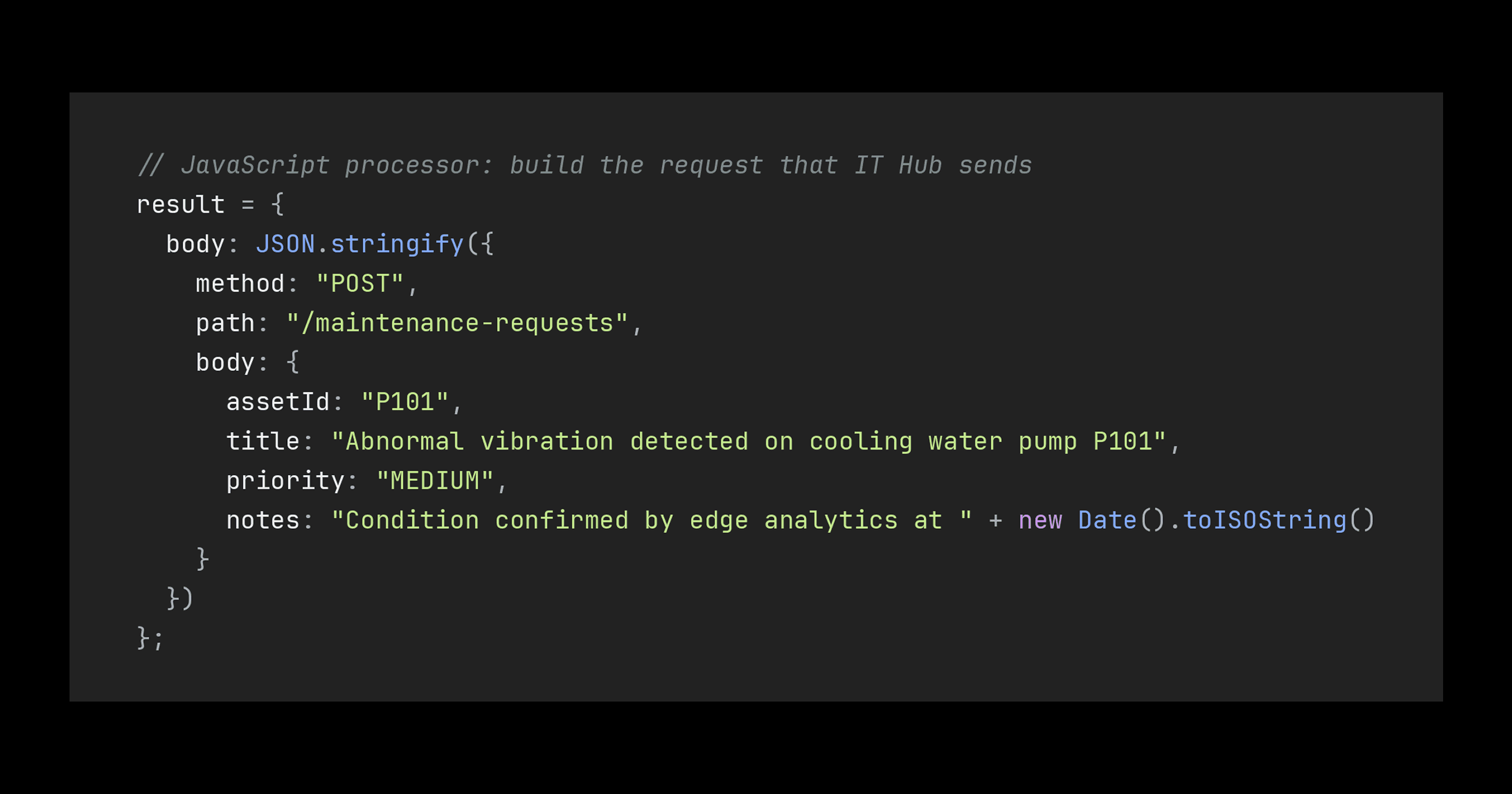
The maintenance system replies with the new request number, which the flow shows next to the alert on the operator’s dashboard. A planner then reviews the request and schedules the work, with the supporting data already attached.
If something goes wrong, such as an unknown asset ID or the system being offline, IT Hub returns an error status with the reason. The flow can then retry or raise an alert instead of failing quietly.
The biggest change is where decisions happen. The flow that spots a problem can also open the work order, fetch the spec, or update the record, so nobody retypes data between screens and nothing waits for an overnight batch job. Response time drops from however long it takes someone to notice to however long the call takes.
Data also arrives with its meaning attached. When readings carry the order, batch, and material they belong to, the reports, OEE figures, and AI models built on them line up with how the business already measures itself.
There's less to maintain, too. Each system is configured once as a connector, and the requests live in the same visual flow as the logic that triggers them, not in scripts that only one person understands. Every call returns a status, latency, and correlation ID, so anyone can see what was asked, what came back, and when.
Control stays with you. Credentials sit in the connector, not the flow. Where a connector supports it, commands that change data stay off until you switch them on, and the service account's own permissions set the outer limit. And because flows and connectors are part of the Litmus Edge configuration, a pattern that works on one line can be packaged as a template and rolled out to other plants through Litmus Edge Manager.
Pick one read-only lookup that saves someone a manual step today, like pulling the active order for a line. It proves the pattern without any risk to the system of record.
- 1.
Under Integration, set up the connector for the target database, REST API, or business application, with its credentials, encryption, timeouts, and retry rules. Connectors that support IT Hub show up in the processor's connector list.
- 2.
In Analytics, add the IT Hub processor to a flow, choose the connector, and set a response topic for the results.
- 3.
Enter a fixed query or request, or let an upstream processor send one with live values.
- 4.
Decide how it runs: on a timer, whenever an upstream processor sends a value, or by hand.
- 5.
Invoke it manually, check the response in Analytics, and only then wire up the next steps.
IT Hub is a processor in Litmus Edge Analytics. It sends a SQL query or REST request to an IT or business system through an Integration connector and returns the response to the same flow, so the edge can act on the answer.
Integration connectors move data along fixed routes, continuously and in the same way for every message. IT Hub uses those connectors from inside an Analytics flow to send a specific command when the flow needs it and bring the answer back. Your existing integrations keep running as they are.
IT Hub works with Integration connectors that support commands, including relational databases such as PostgreSQL, MySQL, and Microsoft SQL Server, MongoDB, any REST API, and selected enterprise application connectors. The connector list inside the IT Hub processor shows what's available on your system.
No. A fixed query or request goes straight into the processor. A short JavaScript processor upstream is only needed when each request has to carry live values, such as an asset ID or a reading.
Both. SQL connectors can run queries and inserts, and REST connectors can send GET, POST, PUT, PATCH, and DELETE requests. Where a connector supports it, commands that change data stay disabled until you allow them.
IT Hub returns an error status with the reason, and the processor shows its error state in Analytics. The connector's retry and backoff settings handle short outages, and the flow can send errors to an alert or a fallback.
Litmus Edge has always been good at getting plant data to IT. With IT Hub in Litmus Edge Analytics, the edge can now work with IT systems too: look up orders and specs, create and update records, call any API, and act on the answer in the same flow. Teams respond to events faster, data carries its business meaning from the start, and there are fewer one-off integrations to keep alive.
Want to see what it could do on your lines? Talk to the Litmus team about the first workflow between your plant floor and your business systems that you'd like to close the loop on.